- Install and configure redundant services. Install and configure all CygNet sites in the redundancy environment in the usual way.
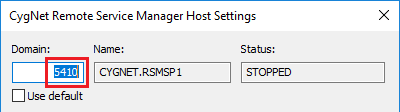
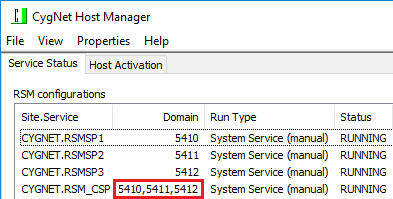
- Install the SCADA services on each host with one RSM. Each redundant RSM must be uniquely named.
- Install the Measurement service (FMS) only if running on a Primary host.
Note the following when setting up your services:
- Uniquely named RSMs — All RSMs defined in the redundancy definition must be uniquely named. Redundant RSMs register on multiple domains so they must be uniquely named across multiple domains. The CygNet Host Manager cannot own two RSM services with the same name.
- Primary domain. A redundant RSM has the concept of a primary domain.
- RSM control. All services must be controlled by an RSM. A redundant RSM cannot manage non-redundant services. Inversely, a non-redundant RSM cannot manage redundant services.
- Different domains. The CygNet Host Manager can run services on different domains. The ambient domain may not match your current state.
- Don't mix redundant and non-redundant services — Best practice recommends that you don’t mix redundant and non-redundant services on the same domain. You can't have non-redundant services running on the same domain where there are redundant services running. If you do configure your services in this way, there is the possibility that the non-redundant services will become unavailable after a failover. If this is a required configuration, you can mitigate this risk by making sure you have a non-redundant ARS running on the domain (often referred to as a bastion ARS) that is the owner for the ARS records of the non-redundant services.
- Identical service sets — All sites must have identical services sets. When configuring redundancy services with multiple sites and domains within a redundant environment, each site on each domain must have the exact same set of services across all redundant sets. For example, if you have four domains consisting of two sets of redundant pairs, each set must have the same list of services, as shown in the diagram to the right.
- AUD and ELS records. All CygNet services guarantee delivery for AUD records, but not for ELS records. Consider using an AUD and an ELS in a Bastion host for seamless recording of audit and event records.
- Measurement redundancy. The Measurement service (FMS) can only be configured for redundancy between data centers. The FMS only supports data-center failover; it does not support local redundancy. Local redundancy can be achieved with Microsoft SQL server replication and/or clustering.A redundant RSM will not start an FMS on a domain defined as in the local standby role. If you are configuring a local failover with a site that includes an FMS, the FMS can be included, but the local standby FMS service will not start. See Configuring FMS Redundancy for more information.
- License master. You should have a single ARS configured to be the license master per domain. It's acceptable if this ARS is unavailable for short periods of time.
Note: In a multi-domain redundant system, since an ARS controlled by an RSM in redundancy mode will now be on each domain on which it can potentially run, the decision about which ARS is configured to be the license master becomes more difficult to make. We recommend that one ARS in each network be designated as the license master. If that ARS becomes unavailable for an extended period of time, then a different ARS should be promoted to the license master role, which will require a restart of that newly designated master ARS.

|
| Identical Service Sets |